The Crop That Makes a Picture Look Certain
Compare a photograph’s crop with wider versions to see how framing changes relationships, identify the source of each version, and keep missing context in view.
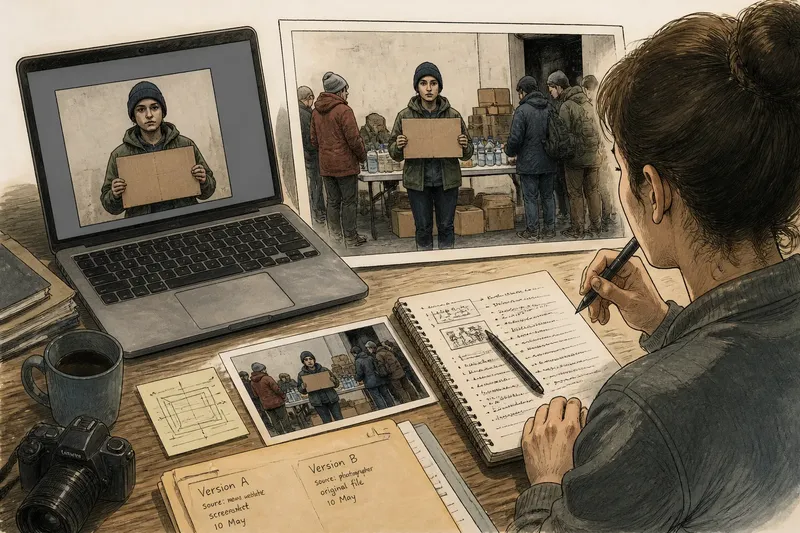
Which version of this photograph are you looking at, and what changed between it and the others? A photograph’s crop can make a scene seem settled by hiding the alternatives at its edges. Comparing versions—not guessing what is missing—is the clearest way to see how framing shapes the picture.
A crop changes relationships, not just dimensions
When a frame tightens around a person or object, it can remove the things that explain how they relate to their surroundings. The subject stays the same; its company does not. A hand reaching across a table may look like a gesture toward one person in a tight crop and part of a group activity in a wider one.
Say you encounter an invented, hypothetical image of a person holding a cardboard sign. The displayed crop includes only the person and sign. You locate a wider file from the same photograph, compare the edges, and see a supply table and several people waiting nearby. The tight version emphasizes an individual; the wider one places that person within an apparent event. The added details change the reading, but do not establish every circumstance.
A wider frame is not automatically more complete, and a tight crop is not automatically deceptive. Each version has a boundary. The useful question is whether a particular framing changes a relationship that matters to your interpretation.
Track how each version was framed
When versions are available, compare them side by side rather than relying on memory. Keep the subject in view and note which parts of the scene appear or disappear at the left, right, top, and bottom. Then check whether the differences change the apparent distance, direction, or connection between people and objects.
Framing provenance means keeping track of where a particular version came from and how it reached you. A file may be the camera image, an edited copy, a screenshot, or a version prepared for a publication or display. The image alone may not identify which it is. Preserve the source name, surrounding page or post, and any available file information; treat unclear history as unclear, not as evidence of a particular motive.
For a simple comparison, place the two files side by side in an image viewer such as Preview or Photos. If you have a print and a digital version, photograph or scan the print without trimming it further, then compare the visible borders. Keep the copies distinct: renaming a file can help you organize versions, but it does not establish which one came first.
Use the edges as comparison points
Edges are useful because they reveal where versions differ. A partial shoulder, an interrupted line, or half a sign can show that the frame cuts through a larger form. It cannot identify what lies beyond the edge or explain why it was excluded.
- Inspect the left and right edges. If a person or object appears in only one version, note how that changes the visible relationships; if no relevant difference appears, keep the interpretation unchanged.
- Inspect the top and bottom edges. If a sign, tabletop, doorway, or ground surface becomes visible, consider whether it changes the setting; if it adds no relevant relation, record it as additional detail rather than a new explanation.
- Compare interrupted shapes. If a cut-off hand or tool becomes whole in another version, revise your description of the visible action; if it remains cut off, leave the action unresolved.
- Check the space around the subject. If a wider frame shows nearby people or objects, describe their visible positions; if it only adds empty surroundings, do not assign them a role.
- Record each version’s source. If the source is identifiable, keep that provenance with the image; if it is not, mark it unknown and avoid claiming that one frame is the original.
- Look for a second image from the same moment. If one is available, compare its viewpoint and timing before treating it as a continuation; if none is available, do not fill the gap with an assumed sequence.
Know what a wider frame can and cannot settle
A wider view can show more of the room, street, or group, but it still records one viewpoint at one moment. It may reveal a doorway while excluding what is behind the photographer. More area supplies more material for comparison; it does not turn a photograph into a complete account.
A crop can also serve an ordinary purpose: fitting a page layout, isolating a detail, or removing visual clutter. To understand its effect, compare the framing with another version and note what changes. The image itself may not tell you who made the crop or why. That calls for provenance from a file history, publisher, creator, or other source, where available.
If the wider version is unavailable, describe the frame’s limits precisely: the photograph cuts off a hand at the wrist, or excludes the surrounding room. Those statements identify what can be checked. A claim about what the excluded space contains needs another source.
What should you check when comparing versions?
How can I tell whether two crops come from the same photograph?
Compare distinctive details such as the subject’s pose, background lines, and light and shadow, while allowing for resizing or color changes. If those details do not align, treat the images as potentially different exposures rather than as alternate crops.
Does the wider version show the original frame?
Not necessarily. A wider file may still have been cropped or edited, so check its source and history where possible; without that information, call it a wider version, not the original.
What if there is no wider version?
Describe what the available frame includes and where it cuts off, then leave the excluded area open. A visible sliver can prompt a question, but it cannot answer it.
Can the crop alone reveal why it was made?
No. The same framing choice can serve different purposes, and the image may carry no record of the decision. Look for information from the person or organization that supplied the version before attributing an intention.
To read a crop carefully, compare the versions you can actually trace, note the differences at their borders, and keep each file’s framing provenance with it. A frame is a little like a window: its clear view does not tell you what is outside its edges, or who chose where it was placed. That limit is useful—it keeps a tidy composition from being mistaken for a complete scene.